
Backtesting System Features
List of Features one can have in their Tradingview's Pinescript Strategy Backtesting Program
These features are examples of what can be implemented in a strategy backtesting program. Their impact and effectiveness will vary depending on your trading rules, market conditions, and risk approach.
Higher Timeframe Alignment

Strengthen your strategy by confirming signals with higher-timeframe trends. This feature lets your entries trigger only when they agree with broader market direction—such as using a higher-TF EMA, RSI, or structure filter. It helps reduce noise, avoid counter-trend trades, and significantly improve overall reliability. By aligning lower-timeframe signals with higher-timeframe momentum, you create a smarter, more robust trading system.
Custom Start-End Period

Test your strategy exactly where it matters most. With a custom backtesting period, you can choose the exact start and end dates for performance evaluation—whether you want to analyze specific market conditions, avoid irrelevant historical data, or focus on recent behavior. This feature gives you precise control and clearer insights into how your strategy performs during the periods that are most important to you.
Session Wise Signals

Allow your strategy to trade only within specific market hours. With custom session timing controls, you can limit entries to the most active or most reliable periods of the day. This helps avoid low-volume conditions, reduces false signals, and gives you cleaner, more realistic backtesting results tailored to your trading style.
Signal Filter

Enhance your strategy’s accuracy by adding simple yet effective indicator-based filters. These small add-on conditions help remove low-quality signals, avoid choppy market entries, and improve overall trade selection. With customizable filters, you gain tighter control over when your strategy should—or shouldn’t—take a trade, leading to cleaner and more consistent backtesting results.
Intraday Exit - Time Set

Automatically close open positions at a user-defined time before market close. This feature helps avoid overnight risk, aligns with intraday trading rules, and ensures clean day-wise performance tracking. It’s essential for traders who want disciplined exits and accurate intraday backtesting results.
Strategy Checklist Table

Get an instant health check of your strategy at a glance. This table evaluates key performance criteria—such as positive net profit, win rate above a defined threshold, and a favorable profit factor—and clearly shows which conditions are met. It helps you quickly validate whether a strategy meets your minimum standards, making decision-making faster, more objective, and data-driven.
Quick Trade Info Stats Table

Stay informed in real time with a compact snapshot of your active trade. This table displays key details such as the current position type, running open profit, active TP and SL levels, and distance remaining to each. It provides instant clarity without clutter, helping you monitor trade status efficiently and make informed decisions at a glance.
Risk Reward Exit

Set precise Take Profit and Stop Loss levels based on your preferred risk–reward ratio. This feature automatically manages exits by calculating targets relative to your entry price, ensuring disciplined trade management every time. Whether you aim for steady gains or aggressive targets, risk–reward exits bring consistency, reduce emotional decision-making, and give your strategy a professional, rule-based edge.
POINTS BASED RR

Define your Take Profit and Stop Loss using fixed price points instead of percentage or ATR-based levels. This gives you full control over exact market distances, making it ideal for instruments with predictable tick movements or strategies that rely on fixed-range setups. Points-based R:R ensures clarity, precision, and consistency in both backtesting and live execution.
Pips Based R:R

Define your Stop Loss and Take Profit using pip values, making this feature ideal for forex and currency-based instruments. Pip-based RR ensures precise, standardized risk control across different pairs and timeframes, helping you maintain consistent trade sizing and realistic backtesting results tailored to FX trading.
Ticks Based R:R

Set your Stop Loss and Take Profit using tick values for maximum precision. This feature is ideal for futures and instruments where price moves in defined tick increments. Tick-based RR ensures accurate risk calculations, consistent trade management, and highly realistic backtesting aligned with actual market mechanics.
% based R:R

Manage your trades using percentage-based Stop Loss and Take Profit levels relative to the entry price. This approach automatically adapts to price scale and volatility, making it suitable across different instruments and timeframes. %-based RR delivers consistent risk management and reliable backtesting without manual recalibration.
ATR Based R:R

Define Stop Loss and Take Profit levels using the Average True Range, allowing exits to adapt dynamically to market volatility. ATR-based RR helps prevent tight stops in volatile conditions and avoids oversized targets in low volatility. It’s a smart, adaptive risk management method that improves trade consistency and realism in backtesting.
Martiangle Feature
Automatically adjust position size after a loss to recover previous drawdowns more efficiently. The Martingale feature increases trade quantity based on predefined rules, allowing the strategy to capitalize on winning reversals. When used with proper risk controls, it helps optimize recovery cycles and provides deeper insight into how position sizing impacts overall performance during backtesting.
Trailing to Break-Even

Secure your trades automatically by shifting the Stop Loss to breakeven once price reaches a user-defined level (in points or percent). This protects your capital by eliminating risk after the market moves in your favor. With breakeven trailing, you safeguard winning trades early while keeping full potential open for further gains—a simple yet highly effective risk-management upgrade.
Target to Target Trailing
Manage your trades with precision using a step-based trailing system. With multiple targets (up to three), your Stop Loss automatically moves as each target is hit—first to breakeven, then to previous target levels. This method locks in profits progressively while still allowing the trade room to reach higher targets. It’s a powerful way to protect gains, reduce risk, and optimize overall trade performance.
Ticks Based (Live Trailing)
Enable ultra-responsive stop management with tick-by-tick trailing. Instead of waiting for candle close, the Stop Loss updates instantly on every new high or low tick. This allows tighter risk control, faster profit protection, and more realistic trade management—especially crucial for fast-moving markets and intraday strategies.
Long only / Short only

Gain full directional control over your strategy by choosing to trade only long positions, only short positions, or both. This feature is especially useful for markets with directional bias or for testing how your strategy performs in bullish versus bearish conditions. It helps isolate performance, reduce unwanted trades, and fine-tune your strategy to specific market environments.
Statistics Table : Month by Month PnL

Get a clear, organized view of your strategy’s performance with a month-by-month PnL breakdown. This table helps you quickly identify strong and weak periods, seasonal patterns, and consistency across different market conditions. A must-have feature for evaluating long-term reliability and making data-driven improvements to your strategy.
Statistic Table : PnL by Days of Week

Understand which days your strategy performs best. This table breaks down PnL by each day of the week, revealing patterns such as high-probability days, weak days, and days to avoid altogether. It’s a powerful insight tool that helps refine your trading schedule and improve overall strategy efficiency.
Statistics Table : PnL by Sessions

Analyze how your strategy performs across different trading sessions—such as New York, London, Tokyo, or any custom session you define. This table breaks down PnL session by session, helping you identify which time windows deliver the strongest results and which ones may be hurting performance. With session-wise insights, you can optimize trading hours and focus only on the most profitable market periods.
Reversal Trades
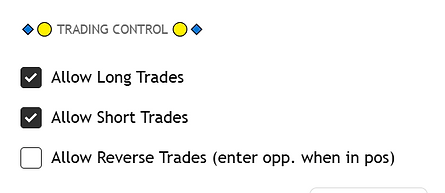
Enable your strategy to instantly reverse direction when an opposite signal appears. Instead of waiting for a full exit, the system closes the current position and enters a new trade in the opposite direction. This helps capture sharp trend changes faster, reduces idle time, and ensures your strategy stays aligned with real-time market momentum.
Multiple Trading Modes
Test different strategy logics within a single program. This feature allows you to define multiple rule sets and switch between them using a simple dropdown input. It’s ideal for comparing variations, optimizing approaches, and experimenting without needing separate scripts—saving time while giving you deeper insights into what works best.